I believe I haven’t seen this mentioned anywhere as a request. Apologies if I’m mistaken.
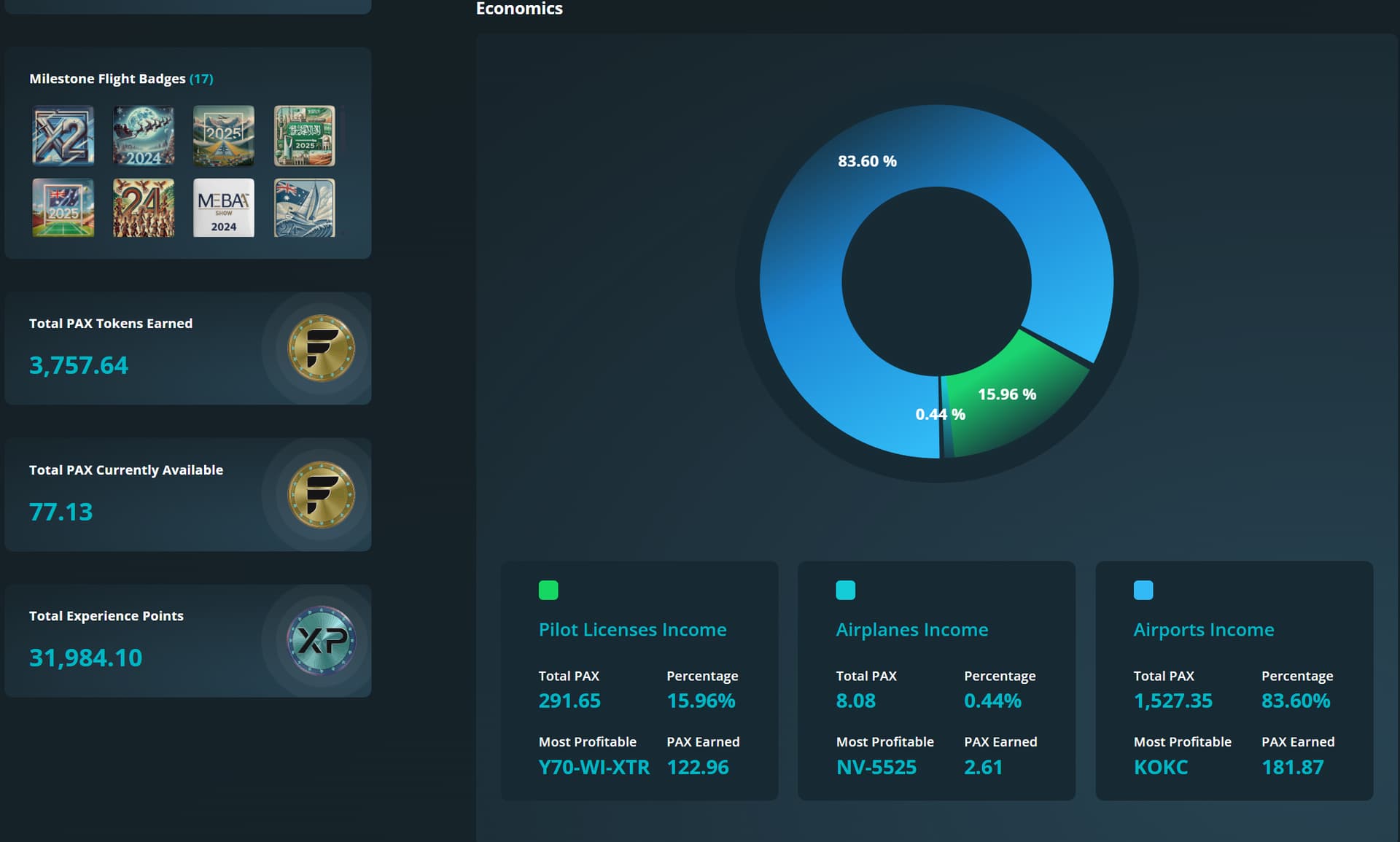
The issue is that when I look at my total earnings in my logbook, adding up my assets doesn’t match the figures shown on the left-hand side. There we have “Total PAX earned”, “Total PAX available”, and “Total Experience Points”. If I add up the value of my licenses + airports + aircraft, this sum doesn’t match the total earnings. This suggests that we have two general categories:
Earnings I get directly from my assets
Indirect earnings from external sources
What I mean is that it would be helpful to have a clearer breakdown and know directly the ratio of earnings coming from my actions, licenses, and properties, while also indicating where the additional amounts come from. I’m not sure if I’m explaining myself properly… or if I’m wrong, but usually when I try to figure out where my total earnings come from, there are some gaps I can’t account for.
On the other hand, all the PAX you spend don’t have a place where they can be viewed in a categorized and grouped way. Indeed, in the PAX Wallet, you can eventually find them, but you have to search page by page, and there’s no logical search for “Expenses.” It would be nice to have a more detailed financial balance of your earnings.
Ultimately, with these comments, I wanted to propose a more specific section to register transactions like a financial balance sheet — for both monetary ($) and PAX transactions. In addition to a breakdown of earnings from assets and non-assets. Something a bit more advanced, with different search and filter options. That would be the overall request.
In the screenshot below, the UI indicates I have earned 3757 PAX but adding the income from licenses, airplanes, and airports, the total should be closer to 2740 PAX (given my airports have 60% pilot payout).
Hi guys,
I’ll try to answer both of you with a single message.
The “Total PAX Tokens Earned” section in the Logbook shows all PAX Tokens accumulated at the overall gross level.
This means that, in addition to earnings from licenses, aircraft, and airports, the total also includes:
Special rewards in PAX Tokens, such as airdrops granted to users who participated in the SimFly presale.
Refunds in PAX Tokens issued by SimFly in case of errors detected in certain missions.
Gross earnings from airports and aircraft before the pilot split.
For example: if an airport generates 100 PAX with a 60% split to pilots, the Logbook will still display 100 PAX as gross earnings. The 60% expense will then appear separately in your PAX Wallet. In other words, you effectively earned those PAX, but later spent them through the pilot split (the same logic applies to aircraft).
In your PAX Wallet, you can find all the details that make up the total displayed in the Logbook. Soon, a CSV download function will also be available, making it easier to verify that the sum of all entries matches the overall value shown.
Thanks to your feedback, we will continue working to make this section clearer and more comprehensive, introducing more advanced and useful analysis tools.
In summary: the Total PAX Tokens Earned figure does not depend exclusively on asset revenues, but includes all PAX Token inflows, regardless of their origin, always calculated at the overall gross level.