Hi everyone,
I wanted to share a possible issue I noticed with the Pilot License timers, and I’m curious if anyone else is experiencing the same.
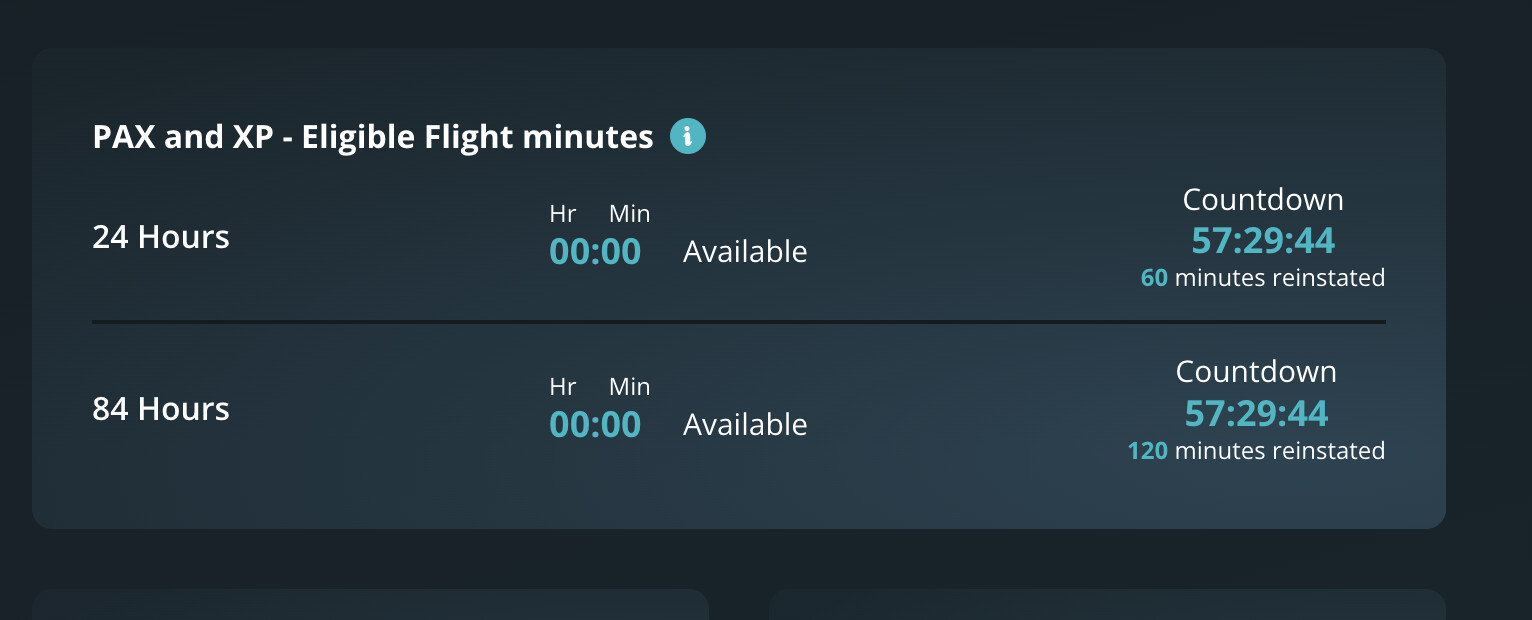
Both my 24-hour and 84-hour timers are currently showing the exact same countdown time (in my case, 57:29:44). This seems off, since:
- The 24h timer is supposed to regenerate 60 minutes every 24 hours
- The 84h timer should regenerate 120 minutes every 84 hours
Yet both countdowns are ticking down together, as if they’re synced — which shouldn’t be the case based on how the system is explained.
I’ve attached a screenshot.
This might be a visual bug or an underlying sync issue. I’ve already sent a message to support, but I wanted to bring it up here too in case others have seen something similar — or if a dev can confirm whether this is intended behavior.
Aside from this, I’m really enjoying SimFly and appreciate all the hard work behind the project. Just hoping small bugs like this can be caught early as the platform continues to grow. 
Thanks and blue skies!
CaptainDavid
That’s right, my friend, although like you, it also confuses me.
It’s a two-part time system, possibly designed to balance flight hours and rest. I’ve accepted it, but I still don’t fully understand what its exact purpose is.
I think it would be much simpler to have a single counter that forces you to rest for X hours after X hours of flying—just like it works in real life for a truck driver, for example.
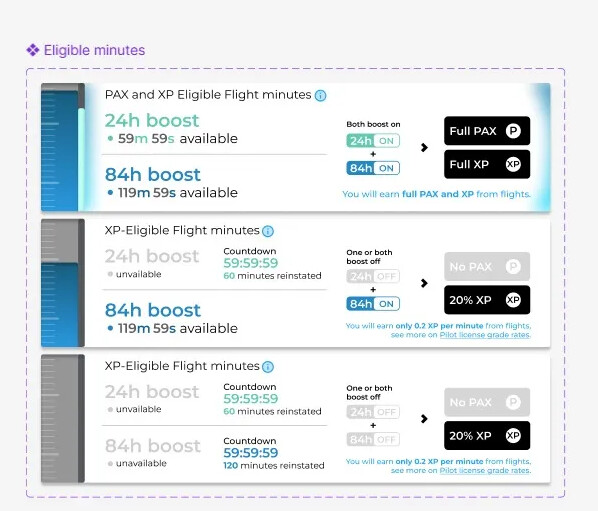
In any case, they’ve already announced that they’re working on modifying not the concept itself, but how it’s displayed, to make it more understandable. They shared some images. If I find them, I’ll send them to you.
Best regards and happy flying!
They pass this image some months ago. But it doesn’t explain why this rule.
Thank you!
I haven´t recieved yet response from support…
Regarding the timers, keep the following in mind:
- The 84-hour timer is the one that takes precedence (The boss)
- As long as this one hasn’t run out, the 24-hour timer takes effect every 24 hours.
- If the 84-hour timer runs out, you have to wait for both timers to reset.
In the end, it’s simple. Convoluted, but simple 
3 Likes
I have just got a reply from support, it is a bug from their side that it will need to be fixed.
Hi, I can confirm that the behavior you’re seeing is intentional and not the result of a bug.
In the meantime, our team is working on a major update to the user interface, aiming to simplify the experience and make the timers related to the Pilot License easier to understand. 
1 Like
Thank you for your response, Karim.
However, I must respectfully say that this is a very confusing and disappointing experience from a user’s perspective.
Just today, the SimFly support team replied to my ticket saying that this was a bug on your side and that the issue was being forwarded to the technical team for verification. Now, in this forum, I’m being told the opposite, that it is intentional behavior.
More importantly, nowhere in the official documentation or on the website is this behavior explained or justified, especially the fact that both the 24h and 84h timers can end up with identical countdowns, which directly affects how new pilots earn rewards.
If this is intentional, I kindly ask the SimFly team to make this behavior fully transparent in the wiki or onboarding guide, and perhaps consider improving the timer system so it’s more intuitive and fair for all pilots, especially beginners.
Thank you for listening and for your efforts in improving the system.
Before writing to you, I double-checked and asked the team whether they actually confirmed it was a bug. From what I can see, they did not say or confirm that it was a bug.
This was the team’s response:
Thank you so much for reporting the issue with the pilot license timers! We have forwarded your request to our technical team for verification. In the meantime, we’re delighted to hear that you’re enjoying your experience with SimFly! We’ll keep you updated as soon as we have any news. Thanks for your patience and for choosing SimFly!
That’s why I decided to write to you — just to make sure there hasn’t been a misunderstanding.
1 Like
Regarding your concern
This was a deliberate choice because: when the 84-hour timer is activated, the 24-hour timer is temporarily synchronized and displays the same remaining time.
Normally, the 24-hour timer operates independently: it resets every day, when active, restoring the available minutes on a daily basis. However, once the 84-hour cycle begins, it takes control and becomes the sole reference for restoring minutes. To avoid confusion, we decided not to display two separate countdowns linked to the two timers.
As Falcon rightly said: “The 84-hour timer is the one that takes precedence (The boss).”
Showing two active countdowns with different values — for example, 84h timer: 57:29:44 and 24h timer: 16:04:24 — could have created uncertainty about the actual wait time. That’s why, once the 84-hour timer is active, both countdowns show the same value, clearly indicating the time that really matters for the next reset.
Of course, we’re aware that even this solution might raise some questions, and that’s exactly why we’re working to further improve the user experience.
Thank you for your suggestion about updating the wiki — I’ll make sure to pass it along to the team so we can include it as soon as possible. Thanks again for your collaboration!
2 Likes
Thank you for your clarification regarding the timer behavior.
Nowhere on the official website, documentation, or wiki is this behavior clearly explained.
Thank you for your time and continued development on SimFly!
2 Likes
Thank you for your report and for your patience. I’ll make sure this detail is added to the license timer section in the wiki, which is constantly evolving thanks to valuable feedback like yours.
Enjoy the rest of your day!
2 Likes
The wiki page dedicated to timers has been updated and revised 
3 Likes