
SimFly Active Airports Tool


SimFly Active Airports is a browser-based flight planning assistance tool that automatically loads SimFly player-owned airport from the community-maintained SimFly Player-Owned Airports database and lets you look up distances, explore routes between any two owners’ airports, and file directly to SimBrief.


What it does

Auto-loads the live airport data

When you open the file, it automatically fetches the current SimFly active player-owned airport information.

File on SimBrief

Once you have valid departure and arrival airports entered, clicking the *File on SimBrief opens SimBrief with your select origin and destination airport.

Manual Point-to-point distance calculator

Type any two ICAO codes and instantly get the great-circle distance in nautical miles. Both fields auto-uppercase as you type, and turn red if the code isn’t in the database.

Hover over the airport names to see additional info. Click on the airport names to see the SimFly details page for the respective airport. Once the app is fully loaded, no further internet connection is required.

Owner-to-owner distance matrix

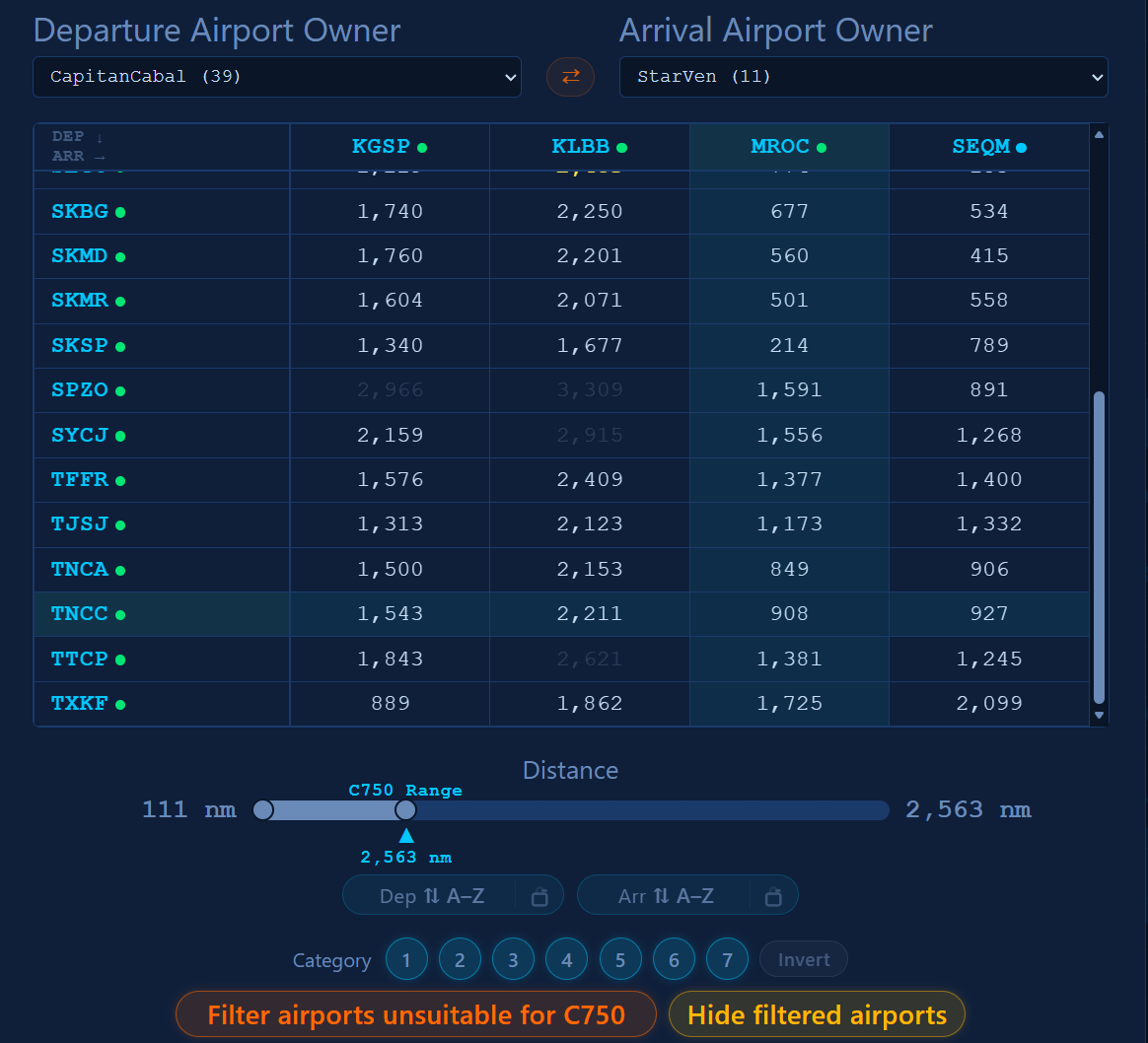
Select any two owners from the dropdowns and the tool builds a full grid showing the distance between every airport pair — departures down the side, arrivals across the top. Click any cell to jump straight to that route in the distance calculator. Click a row or column header to highlight it for easy scanning.

Distance filter slider

A dual-handle slider lets you filter the matrix by distance range. Cells outside the range dim out; the longest qualifying route highlights in yellow.

Distance Map

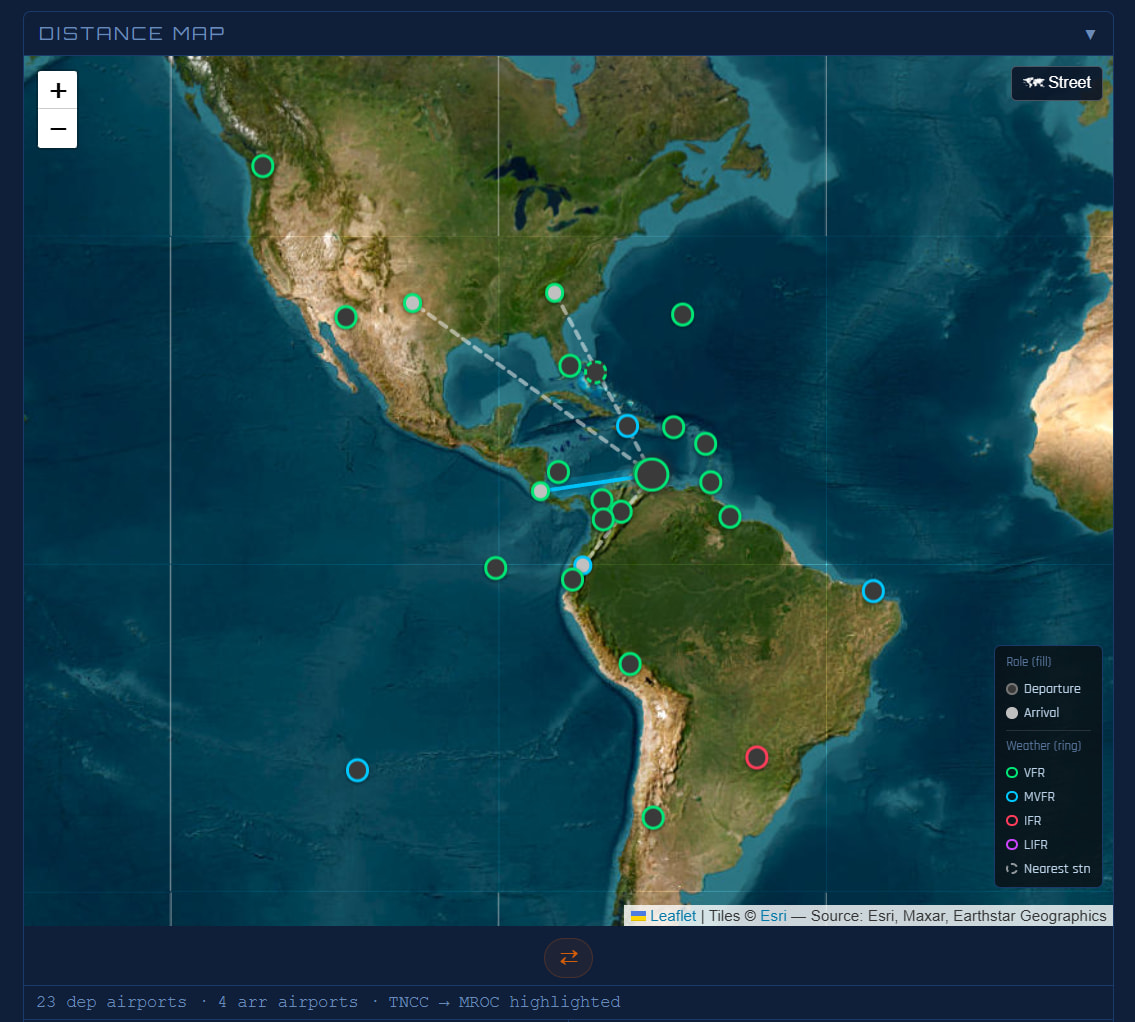
Visually see the relationships between the airports in the matrix. Honors any filtering you apply to the matrix itself.

Airport info tooltips

Hover over any ICAO in the matrix or in the distance result to see a popup with the full airport name, city, country, elevation, and runway details (lengths, surfaces, lighting).

Weather Integration

Click the cloud button at the top of the UI to grab METARS for all airports currently visible in the UI. Industry standard color indicators make it easy to distinguish between IFR, VFR, MVFR, etc. airports.


How to download and set it up

The link below will take you to the GitHub releases page. Download the SimFly_Active_Airports-LATEST.html file from the newest (topmost) release to your downloads folder. Open the html file and enjoy - no software installation or configuration required.

SimFly Active Airports Tool - Latest Version

The app needs an internet connection on startup to fetch the airport database and the current airport and owner information.

8 Likes

Really nice work man, thank you so much!

1 Like

Thank you! Glad it’s working.

1 Like

Very very nice work Kyndra, really useful, thankyou

1 Like

Amazing tool, tks for dev and sharing

1 Like

You always surprise me, you’re amazing! Thank you! Kyndra

1 Like

Thank you for all the kind words and encouragement everyone.

I am hard at work on several improvements. Keep an eye on this thread for an enhanced version in the next few days.

While on vacation, I have been hard at work massively improving this tool. The newest version is available here:

Here’s some of what you can look forward to:

SimFly Active Airports — v1.6.4 → v2.13.7

This release covers 131 versions of iterative development across roughly three weeks, touching every major subsystem. Below is a themed summary of what changed.


:world_map: Distance Map (v2.13.0–v2.13.7)

A full interactive map panel now appears below the distance matrix whenever departure and arrival owners are selected.

  • Leaflet-powered map with Esri satellite and CARTO street tile layers (no API key required)
  • Departure airports plotted as blue markers, arrival airports as green markers
  • Distance lines from the active departure to all arrivals; hover any line for the ICAO pair and NM distance
  • Lines are 18px hit-target buffered for easy hover at any zoom level
  • Hero route highlight — selecting both a dep row and arr column draws a bright cyan glow line for that route
  • Clicking a map marker highlights the corresponding matrix row or column and scrolls to the selection
  • Clicking a distance line selects that route as the hero and highlights the matrix
  • Map respects “Hide filtered airports” — airports filtered from the matrix are also removed from the map, with automatic viewport refit
  • Map is collapsed by default and only loads when first expanded

:airplane: SimBrief Integration (v2.8.7–v2.12.8)

Direct SimBrief dispatch filing from the app, with automatic flight number population.

  • File on SimBrief button passes origin, destination, aircraft type, and flight number directly to SimBrief dispatch
  • Tooltip on the SimBrief button shows origin, dest, aircraft type, and flight number before you click
  • Sticky Flight Planner header — panel title, dep/arr inputs, distance readout, and File on SimBrief remain fixed at the top while the matrix scrolls below
  • Flight number, tooltip content, and suitability filter all correctly refresh when dep/arr changes by any path (typing, matrix click, row label click)

:small_airplane: Aircraft Selector (v2.0.8–v2.9.3)

A full native aircraft selector replaces URL-parameter-only mode, with deep performance integration.

  • SimFly category tabs (Cat 1–7) with count badges; aircraft shown as data cards with coloured category top bars, ICAO code, full name, and TO/LDG spec line
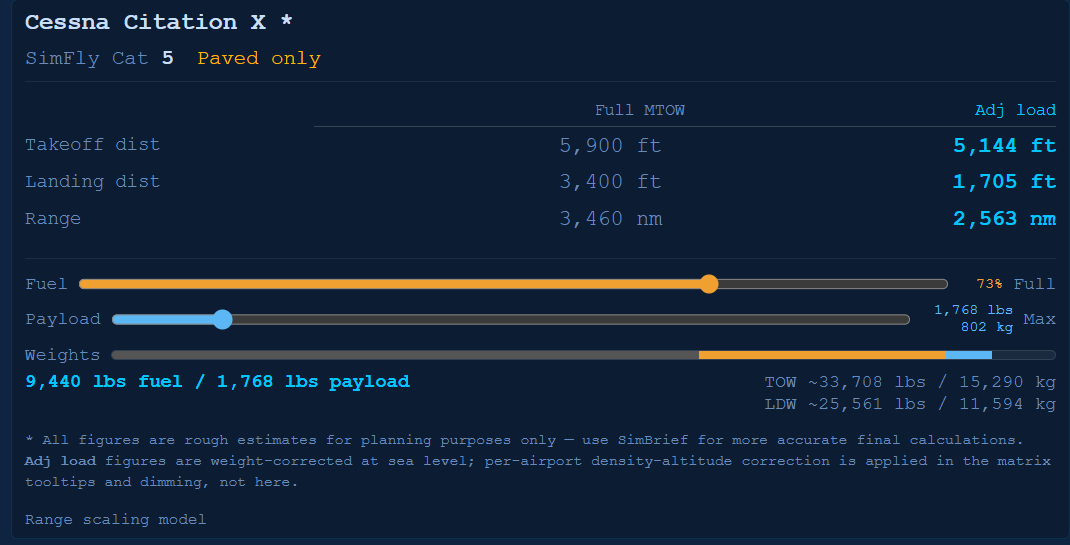
  • Spec strip shows the selected aircraft’s full performance details with a two-column MTOW / Adjusted table
  • Auto-selects aircraft from URL when launched from Recip Tracker (acCode, acLabel, acBrand, etc.)
  • “Filter airports unsuitable for aircraft” button dims departures whose runway is too short for takeoff, arrivals too short for landing, and paved-only aircraft at unpaved airports; Cat 1 airports block Cat 5–7 aircraft
  • Filter button shows the selected aircraft code (e.g. “Filter airports unsuitable for C750”)
  • Filter auto-activates on aircraft selection; re-evaluates whenever departure airport changes
  • Runway supplements — fetches SimFly_Airport_Overrides.json for manually-entered runway data on airports missing OurAirports records; labelled “Runway data: manually supplemented” in tooltips
  • Aircraft suitability section added to all matrix and point-to-point tooltips
  • × Reset now correctly clears the selected aircraft, collapses the panel, and restores all filter state

:balance_scale: Payload & Weight System (v2.10.0–v2.10.23)

A full three-component weight model — OEW, payload, and fuel — replaces the previous single load slider.

  • Payload/cargo slider (blue) adjusts payload from 0% (OEW only) to 100% (max payload), independent of fuel
  • Fuel load slider (amber) represents fuel as % of max capacity: left end = zero range (empty tanks), right end = full range (full tanks)
  • Stacked weight bar shows OEW (grey), payload (blue), and fuel (amber) as proportions of MTOW; rescales with a red overload zone when TOW exceeds MTOW; hover tooltip shows numeric breakdown
  • OEW data added for all ~50 aircraft in the database
  • Breguet range equation replaces the previous empirical formula; uses each aircraft’s actual fuel capacity; published fuel data (lbs, from POH/ACAP) added for all 64 aircraft
  • Three-component weight model: range uses actual ZFW (OEW + payload) in the Breguet ratio; a solo flight at 0% payload correctly shows longer range than a full-load departure
  • Landing weight (LDW) model: spec strip shows LDW; landing distances scale from LDW not TOW; 10% fuel reserve applied to all LDW calculations (fixed, based on max fuel capacity)
  • Route-specific LDW: when both dep and arr are selected, landing weight is computed by inverting the Breguet equation for the actual route distance
  • Payload percentage included in URL parameters passed to/from Recip Tracker
  • Matrix distance dimming and tooltips update live during slider drag; tooltips patched in place on payload drag without requiring a re-hover

:magnifying_glass_tilted_left: Distance Matrix Sorting (v1.6.4–v1.9.9)

Comprehensive overhaul of the two-click sort model, sticky sort, and sort state accuracy.

  • Two-click progressive sort: first click highlights; second click sorts (Nearest → Farthest → A–Z cycle)
  • Sticky sort (padlock icon) — enables one-click sort; pill turns orange; per-axis (Dep and Arr are independent); resets on ✕ Reset
  • Sort pills renamed from Rows/Cols to Dep/Arr; sort requires a pivot (no more average-distance fallback)
  • Numerous fixes to sort state, tooltip accuracy, cross-axis re-sort on first click, and pill sync with applied sort
  • Matrix scroll flash fixed by removing layout-reflow-triggering DOM writes during slider drags
  • Typing an ICAO highlights the matching matrix row or column; sticky sort honoured on auto-highlight

:label: Airport Tooltips & Information (v1.8.0–v2.8.22)

  • Owner shown in all airport info tooltips (matrix row labels, column headers, point-to-point name lines)
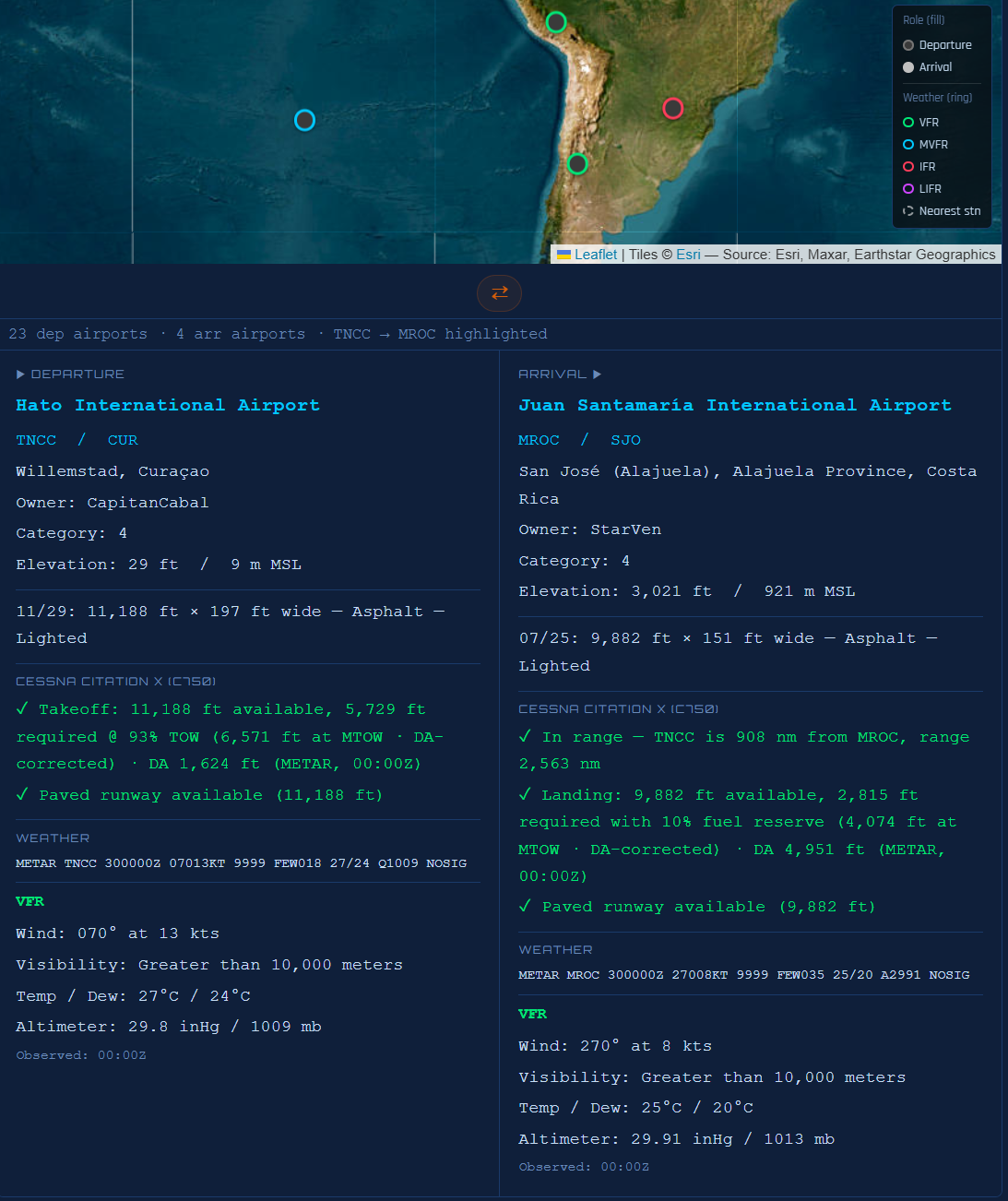
  • Range warning in arrival tooltips: green tick / red cross showing distance vs. aircraft max range, named with both ICAOs (“DEP is X nm from ARR, range Y nm”)
  • Runway surface codes translated to plain English for all OurAirports surface codes
  • Takeoff and landing runway verdicts show both available and required footage; annotated with weight basis (“@ 73% TOW”)
  • Tooltip LDW/TOW updates live while hovering during slider drag (no re-hover required)
  • Tooltip delay configurable; currently 1000 ms; tooltip dismisses on click and updates in place

:artist_palette: UI & Theme (v2.0.0–v2.13.7)

  • Light / dark theme toggle (top-right corner) with blue-on-white light palette; preference persisted to localStorage
  • UTC / Local clock overlay (top-left corner) in 24h Courier New format; correctly readable in both themes
  • Aircraft panel fonts enlarged 40% for legibility; all numeric figures in the spec strip use Courier New
  • Planning disclaimer added: “All figures are rough estimates for planning purposes only”
  • Footer standardized across all four SimFly apps; accent colour; visited-state matches default
  • Accessibility improvements: aria-label, aria-live, aria-valuetext, prefers-reduced-motion, :focus-visible outlines, aria-hidden on decorative glyphs, minimum font sizes
  • Focus trap keeps Tab within the four primary controls; suspended while modals are open

:bug: Notable Bug Fixes

Version Fix
v2.13.3 Distance lines clipped by stacking context on map scroll container
v2.12.9 PAVED / TAR / PER surface codes falsely triggered “No paved runway” warning
v2.12.5 URL-passed fltnum persisted after dep/arr was changed manually
v2.9.3 Aircraft selection crashed renderDistMatrix mid-rebuild, silently breaking all subsequent owner changes
v2.8.12 × Reset left aircraft, owner dropdowns, and suitability filter state intact
v2.8.10 Release notes badge styling lost its CSS selector; badges rendered as plain text
v2.0.5 Distance slider fill drifted on Edge/Mac due to invalid calc(percentage × percentage) CSS
v1.8.4 Matrix viewport reset on every slider tick due to unnecessary style.display writes during drag
v1.7.6 Matrix scroll container tabindex caused focus-triggered scroll resets on re-render
v1.6.6 Swap button only swapped inputs when both row and column were highlighted simultaneously

Full changelog is available inside the app — click Release Notes in the top toolbar.

3 Likes

What’s New

✦ Automatic Update Notifications (v2.14.0)

When you open the app, it silently checks this releases page for a newer version. If one is available, a small orange badge appears next to the version label in the header showing the new version number. Click it to open a new browser tab where you can download the update. Dismiss it with the × — it won’t reappear for that version, but will show again when the next release drops.


Also in this release (changes since v2.13.7)

v2.13.10 — Fix

  • Distance readout wraps cleanly at narrow widths — the departure field, arrow, arrival field, and nm figure now wrap as a group at narrow screen widths rather than pushing the Help, Reset, and File on SimBrief buttons out of place.

v2.13.9 — Improved

  • Flight Planner header is ~30% shorter — the “Flight Planner” title row is gone; Help and Reset are tucked into a compact row above the File on SimBrief button. Padding tightened top and bottom, reclaiming meaningful vertical screen space.

v2.13.8 — Feature

  • Airport info panel below the Distance Map — when you have a departure and arrival selected, a side-by-side panel appears under the map with full details for both airports: name, ICAO/IATA, city, owner, SimFly category, elevation, runway data, and aircraft suitability. Disappears automatically when no route is active.

Download

Visit the link above then grab SimFly_Active_Airports-v2_14_0.html from the assets and replace your existing copy.

1 Like

Congratulations! This is an amazing tool.

Would it be possible to add filters for airports based on distance, category, and level?

For example, let’s say someone wants to fly from a CAT 2, Level 2 airport to a CAT 3, Level 3 airport located between 800 and 1,000 NM away. The tool could list all airport pairs that match those criteria, or even a selected range, without requiring the user to choose the owners first.

It could then show all possible airports that fit the criteria. Owner information could appear during the pairing step, and pilot sharing information could also be displayed if available.

That would be perfect.

Again, congratulations on a job well done!

1 Like

Thank you @CalibraNR.

While I do not have access to airport levels (only categories) everything else should be possible.

The challenge will become how to handle the volume of airports that might match the criteria. For instance let’s say there are 500 airports which satisfy the criteria. Another hurdle would be responsiveness as there would potentially be many hundreds of airports the tool would have to calculate distances for.

I will certainly consider the ideas though. I am glad you are finding the tool useful.

1 Like