Yet another error on SF Client

Is there anyway that I wont have to go back and forth to check if SimFly Client will decide NOT to track my flight after taking off?

Flew to destination for 2+ hours only to find that it was wasted flight.

I’m starting to get unmotivated to fly on SimFly. :frowning:

How can I prevent this from happening again?

2 Likes

Happened to me this morning.

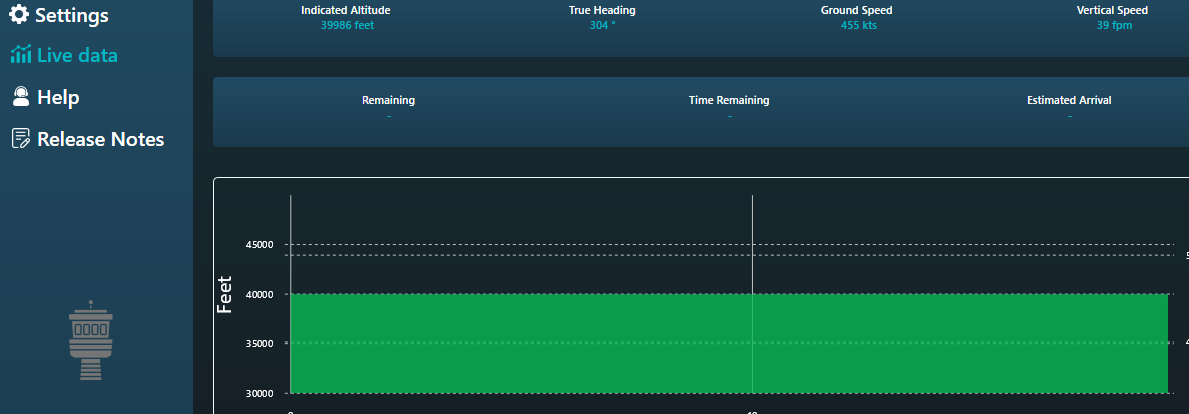
Once you’re on the ground in the sim, before you start getting your plane ready, check the SimFly client Live data. If it has green like in the attached picture, you’re good to go. If not, close it, check task manager that its not still running in the background, and then reopen it.

Thanks. Seems to be another “checklist” to fly for fun on SimFly.

Has anyone else experienced this issue on a recurring basis?

If so please speak up so SimFly knows it’s not an isolated issue.

It’s likely going to take some in depth troubleshooting so I recommend setting up HWiNFO and Claude Desktop to help analyze what’s happening on your system when the issue occurs.

If SimFly can’t reproduce it, they will be entirely dependent on us to help fix it.

2 Likes

Here’s some info Claude recommends you collect/track:

The hidden variables, by symptom

Symptom A — intermittently fails to connect at startup

1. Startup race (highest prior). The SimConnect server isn’t up until the sim reaches the main menu. If the client tries once, or retries for a fixed short window, whether it succeeds depends on who won the load race.

  • Varies with: cold boot vs warm, SSD vs HDD, sim update pending, launch order, whether the user auto-starts the client.
  • Signature: fails on cold boot, works if the user launches the client manually after the sim is up. Almost diagnostic on its own.

2. Connected-but-no-aircraft. Client attaches at the main menu, requests against the user object, gets exceptions, and reports failure. Depends purely on how quickly the user loads a flight.

  • Signature: “it works if I start it after I’m in the plane.”

Symptom B — intermittently drops mid-session

3. Session-state transition. MSFS is widely reported to invalidate client connections on return-to-menu, flight reload, and sometimes aircraft change. A client without reconnect logic just dies there.

  • Signature: the drop is always at a transition, never during steady flight. Ask users to recall what they were doing at the moment it dropped — this question alone separates 3 from 4.

4. Dispatch-queue overrun under load. If the client can’t drain fast enough, SimConnect terminates it. Triggered by sim hitches or by the client’s own pump stalling.

  • Varies with: scenery complexity, weather, AI traffic, streaming, other apps competing for main-thread SimConnect time, the user’s hardware.
  • Signature: drops during loading screens, at dense airports, in bad weather — correlates with stutter, not with any user action. Users describe it as “random,” but it clusters geographically.

5. Aircraft-dependent simvar exceptions. A requested var/unit that a particular aircraft (especially study-level addons) doesn’t expose returns an async exception, not a throw. A client that treats exceptions as fatal disconnects on that aircraft only.

  • Signature: looks random across a population, but is perfectly reproducible per aircraft. The tell is that affected users share an addon, not a machine spec.

6. Slow resource leak. Leaked request/definition IDs, growing buffers, a thread pool starving.

  • Signature: correlates with session duration and nothing else — fails after ~N minutes regardless of what’s happening. Very distinctive; if users can say “it always goes about 40 minutes in,” it’s this and nothing else.

Lower-frequency but genuinely intermittent

  • Power management — sleep/hibernate mid-session, or NIC power-save for network-mode clients.
  • Antivirus real-time scanning touching the process or pipe non-deterministically.
  • Network instability (remote/TCP setups only): Wi-Fi, DHCP lease renewal, VPN reconnects.
  • Other SimConnect clients varying between sessions — either adding main-thread load (feeds into 4) or, if any of them mask input events, changing behavior for everyone.

Discriminators — the questions that actually split these

Ask Answer points at
Connect failure, or connects then drops? A-class vs B-class
Does launching after the sim is fully loaded fix it? 1 or 2
What were you doing the moment it dropped? menu/reload → 3; nothing → 4 or 6
Does it cluster at specific airports or in weather? 4
Same aircraft every time? 5
Roughly the same elapsed time every session? 6
Does the sim itself stutter when it happens? 4
Any other SimConnect tools running? Do they survive? 4 vs a client-side bug

Getting to a real answer

With a population rather than one machine, the fastest route is correlation, not deep-diving any single user:

  1. Split the reports into A (won’t connect) and B (drops). Mixing them is why intermittent bugs look unfalsifiable.
  2. Find what the failing users share and the working users don’t — aircraft, addons, launch method, hardware tier, remote vs local.
  3. Get server-side logs. A SimConnect.ini in the sim’s install folder enables logging that records each connect and disconnect with a reason — that turns this whole list into a single answer. MSFS Dev Mode’s Console shows the same errors live.
  4. Run a minimal reference client alongside. If a bare SDK sample survives while SimFly drops in the same session, it’s client-side (3, 4-pump-side, 5, or 6) and not the sim. If both drop together, it’s the sim or the environment (4-sim-side).

My prior, absent logs: 1 for the connect failures, and 3 or 4 for the drops — those three account for most intermittent SimConnect reports. 5 and 6 are the ones people miss, and both are cheap to rule out with one question each.

Obviously much of this isn’t going to apply but collect and track as much as you can.

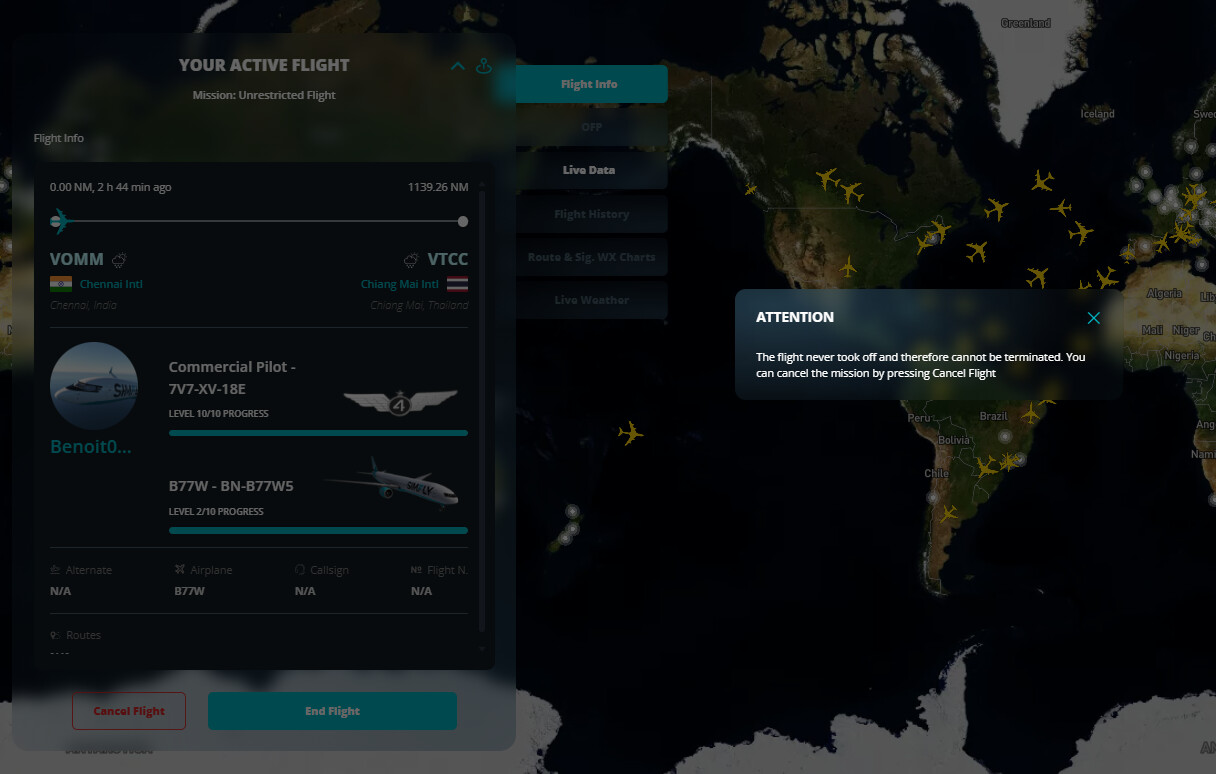
One additional question - when the client fails, does the “YOUR ACTIVE FLIGHT” screen show your aircraft at the departure airport and a plausible flight distance?

Good luck my friends.


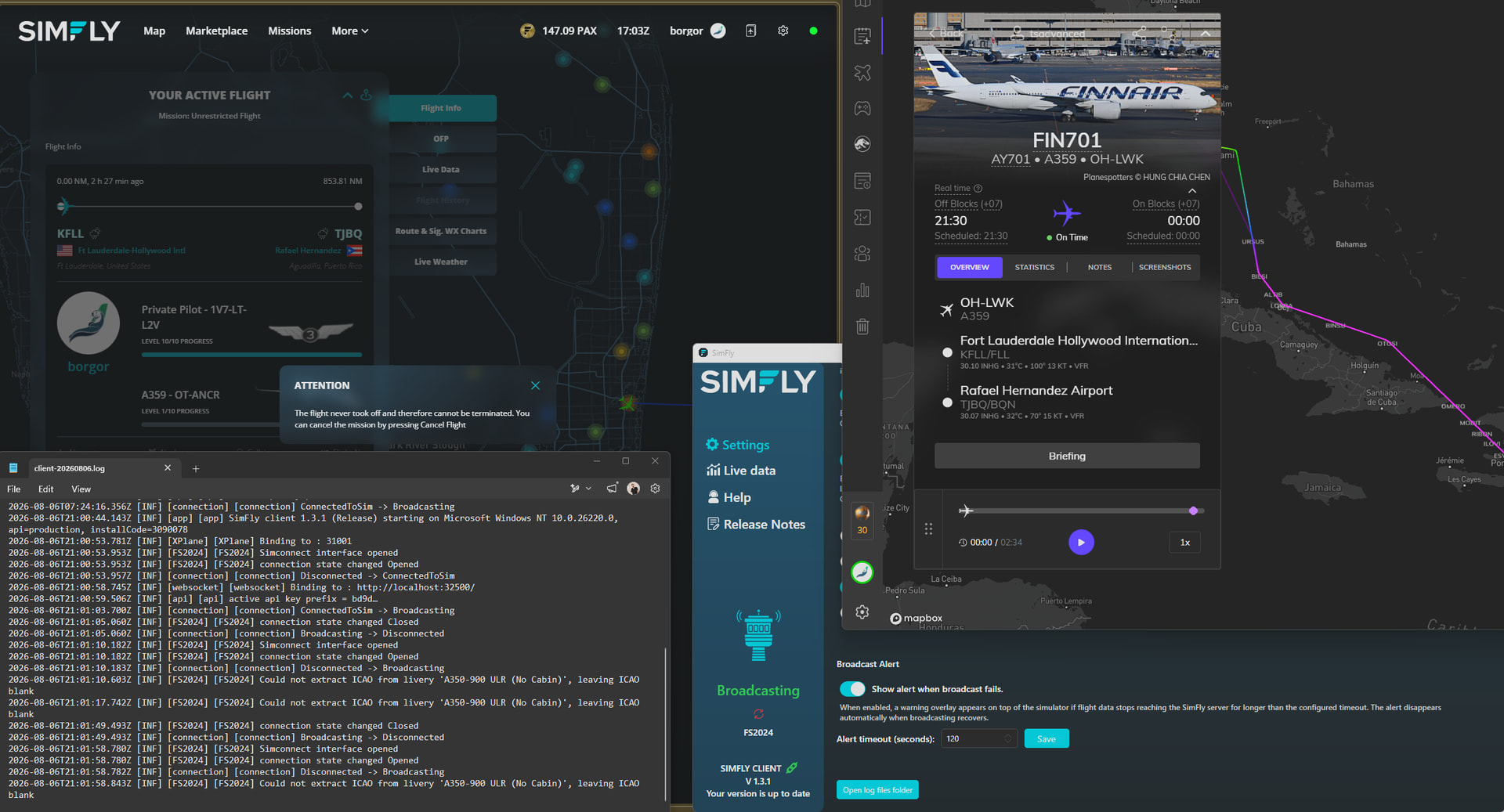
Here’s what Claude says given your screenshot - the TL;DR recommended steps are at the end.

This log is much more informative than a typical “it disconnects” report.

The headline: this is not a connection failure, it’s a connection cycle

The client connects to MSFS 2024 successfully every single time, within milliseconds, then the connection is closed 10–40 seconds later, then it reconnects. Repeatedly.

Event Time (UTC) Duration
Opened 21:00:53.953
Closed 21:01:05.062 up 11.1s
Opened 21:01:10.182 (down 5.1s)
Closed 21:01:49.493 up 39.3s
Opened 21:01:58.780 (down 9.3s)

Three full cycles in 75 seconds.

What this rules out immediately

Against the candidate list from before, this kills most of it outright:

  • All install/config causes — gone. Simconnect interface opened succeeds in ~milliseconds, repeatedly. DLLs, VC++ runtime, bitness, elevation, SimConnect.cfg are all provably fine on this machine.
  • Startup race (#1) — gone, it connects.
  • Slow resource leak (#6) — gone. A leak produces one failure after a long ramp, not a 10-second cycle.
  • Network — gone, this is a local pipe; the websocket binds to localhost:32500 fine.
  • Menu/flight-transition (#3) — very unlikely. Nobody returns to the menu three times in 75 seconds.

Also note the first line: 07:24:16 ConnectedToSim -> Broadcasting, then nothing until the app restarts at 21:00:44 — assuming that’s the head of the file, the same machine and install held a connection with zero state churn that morning. The setup is capable of stability. Something differs about the evening session.

Where the close originates

The ordering matters:

[FS2024]    connection state changed Closed

[connection] Broadcasting -> Disconnected

The FS2024/SimConnect adapter reports the close first, and the higher-level [connection] state machine merely follows. So this is not SimFly’s broadcast logic deciding to drop — it’s either the sim terminating the client, or SimFly’s own SimConnect wrapper detecting a fault. That narrows it to the sim side or the transport layer.

The strongest lead

Could not extract ICAO from livery 'A350-900 ULR (No Cabin)', leaving ICAO blank

Logged after every reconnect. This is candidate #5 — aircraft-dependent behavior — with a name attached. The “(No Cabin)” variant naming and the ULR designation point to a third-party addon A350 rather than anything stock (most likely iniBuilds, though I’d confirm rather than assume). That’s a heavy WASM aircraft that does substantial SimConnect work of its own.

Two things follow:

  1. The app is already demonstrably failing to parse this aircraft’s metadata. That’s benign on its own ([INF], handled by blanking the field), but it proves the aircraft presents non-standard title/livery strings, and it raises the odds that other aircraft-dependent requests are misbehaving too.
  2. A WASM-heavy addon adds main-thread SimConnect load, which feeds directly into the queue-overrun mechanism.

The single highest-value test: have the user fly a stock aircraft and watch the log. If the Open/Closed churn stops, it’s the aircraft, and you have your answer in five minutes.

Two other things worth flagging

Their alert is set to never fire. Broadcast Alert timeout is 120 seconds, but the longest gap here is 9.3s. The user gets no warning at all — the problem is completely invisible from the UI, which is likely why it reads as vague intermittency rather than a hard fault. Have them drop it to ~20s to make it observable, and to measure whether it’s improving.

The reconnect gaps look like a fixed ~5s retry. 5.1s is one poll; 9.3s is two, implying an attempt around 21:01:54 that failed silently and isn’t logged. Minor, but it hints the sim was briefly not accepting connections — which would point at the sim being busy rather than SimFly being at fault.

The log level is the real obstacle. Every line is [INF] — there are no WARN/ERROR entries, no SimConnect exception messages, and 32 seconds of complete silence before the second close. Nothing in this log states why the connection closed, because that log level doesn’t record it.

On the visible symptom

The ATTENTION: The flight never took off dialog and the 0.00 NM on an active flight created 2h27m ago are consistent with a tracking session that never accumulates enough continuous data to register a departure. I’d treat that as the downstream consequence rather than a separate issue — though note the app was only started at 21:00:44, well after the flight was created, so some of that gap is simply the client not running.

What I’d do next, in order

  1. Stock aircraft test. Isolates the A350 in one flight. Cheapest, highest information.
  2. Enable SimConnect server logging (SimConnect.ini in the sim’s install folder) to capture the actual close reason from the server’s side. This converts the whole hypothesis list into a fact.
  3. Ask SimFly support for a debug/verbose log level — the current output can’t distinguish server-terminated from client-terminated.
  4. Ask what else was running at 21:00 that wasn’t at 07:24. Other SimConnect clients, and whether they survived the same window.
  5. Population check: pull the same log from the other affected users and look for two markers — the Open/Closed churn signature, and a non-stock aircraft in the ICAO warning. If the affected users share an aircraft rather than a hardware profile, that confirms it.

Worth noting as a weak variable: Windows NT 10.0.26220.0 is a Windows 11 Insider build. Probably irrelevant, but if the affected users cluster on Insider builds that’s worth knowing.

1 Like

It’s typically the connection - simfly client is very fragile when it comes to connection all of a sudden you may have 15 min mission closure if connection was interrupted even shortly for couple of seconds few times.

1 Like

Connection to SimConnect or connection to SimFly servers?

Simfly servers - at least thats what I think. I have occasionaly that problem but very rare I would say (Simfly mission cancelled invalidated)

Yes, It happen to me already 2 or three times , … and Just now again !

and if you click on red circular arrow to refresh the client :

ALREADY REPORTED 2 months ago !

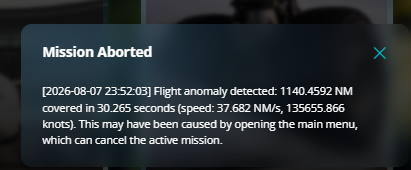
Mission aborted, client failed?

@Karim-CTO-SimFly please can get real fix instead of usual " …will update you as soon as we have any news." and then, no news.

1 Like

Each time this happens, please capture/upload your log information here to this thread.

SimFly are likely unable to reproduce the problem on their end.

Here are Claude’s latest theories given the two log files I have seen from users with the issue. The more logs you upload, the better chance we have of actually helping SimFly get to the bottom of this.


The following is from Claude Code

Leading theories

Ranked by current support. Two caveats up front: n=2 logs, one of which is the healthy one, and these are not mutually exclusive — the top two are probably the same story told from different ends.

1. The add-on aircraft drives sim-side SimConnect load past a limit

The strongest correlation and a coherent mechanism. User 1 (borger) flies an A350-900 ULR (No Cabin) — heavy third-party WASM, and its livery metadata is non-standard enough that ICAO extraction fails after every reconnect. User 1 (borger) churns at 96/hr. User 3 (SxTm) flies a CRJ900 that parses cleanly and held a connection for 4h09m unbroken.

Against it: the ICAO failure is a symptom of odd metadata, not a disconnect mechanism — it’s a correlate, and it’s easy to overweight because it’s the most visible difference. It’s also fully confounded: user 1 (borger) is Windows 11 Insider, user 3 (SxTm) is Windows 10, and we know nothing about what else runs on either machine.

2. The simulator is terminating the client

Best mechanistic evidence, weakest discriminating evidence. [FS2024] Closed is logged before the [connection] state machine follows, so the close originates at the transport rather than in SimFly’s broadcast logic. And uptime varies 3.5× (11.1s vs 39.3s), which rules out a fixed watchdog or keepalive — those fire on a timer and produce near-constant uptimes. Variable uptime fits load-driven termination, i.e. queue overrun.

Note this is the same event as theory 1 viewed from the sim’s side. “Heavy WASM aircraft causes queue overrun, sim drops the client” satisfies both.

3. SimFly’s own client

Can’t be excluded, and the silence is what keeps it alive. While dropping twice a minute, user 1’s client logged nothing above INF — and we now know the client is capable of emitting WRN, so that’s not a log-level artefact. It also never logged the failed reconnect that the 9.287s gap proves happened. A client that doesn’t record its own failed retries may not be handling much else either.

4. The client↔SimFly server link

The user-raised theory (raised by shill). Currently unsupported but not excluded, and I’d resist demoting it further than that. The only direct evidence points away: the one observed slow round-trip (3219ms, code=Success) happened during user 3’s 4h09m unbroken interval and caused no drop, and user 1’s churning log contains no [broadcast] lines at all. But that’s weak evidence — a call that stalls hard enough to matter might block before it ever gets to log “slow.”

What would actually settle it

Roughly in order of cost:

  • Stock-aircraft flight — confirms or kills theory 1 in one flight, no software.
  • SimConnect.ini server-side logging — records each disconnect with a reason. This would collapse the whole list to one answer, and it’s the highest-value thing on the list.
  • Canary or Fte.App Preview alongside SimFly — separates “the sim drops everyone” (1/2) from “only SimFly” (3).
  • Ask users for logs containing [broadcast] lines — attacks 4 using data already being collected.

The honest summary: theory 1+2 is where I’d put my money, but nothing here is confirmed, and the evidence separating “sim kills the client” from “client fails and gets killed” doesn’t exist yet in any log we have.

Keep those log uploads coming - even successful flight logs from borger and SxTx will be useful to narrow down the cause of the SimFly client failures.

Hi everyone,

I can confirm that we are still actively working on this issue to identify the exact cause.

The issue has not been forgotten or ignored; the investigation is still ongoing. As soon as we have a confirmed technical finding or a solution, I will update this thread accordingly.

2 Likes

Hello @Karim-CTO-SimFly

Are SimFly able to successfully reproduce the issue/error?

The logs have been shared to SF. Thanks for paying attention in investigating.

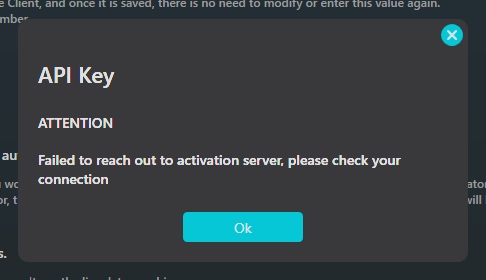
Now, I’m having issue connecting SF altogether after I saw potentially another instance of the flight not being tracked. So I tried refreshing the API key and now after several attempts, SF client refused to connect to the server altogether.

After almost 15 minutes, the client now connectible.